AI Agents Need Guardrails: Building clippy-guard with CLI Hooks
Last week an AI coding agent I was working with ran rm -rf on a directory I didn't intend to delete. The command was technically correct, the agent was cleaning up build artifacts, but it wiped out files I needed. No confirmation. Just gone.
I couldn't even trace what happened after the fact. There was no log of what the agent ran, when, or in which project. The command was just gone from the scrollback.
To prevent this from happening again, I built clippy-guard.
What is clippy-guard
clippy-guard is a terminal guardian that sits between AI coding agents and your shell. It matches every command against safety rules before execution, blocks dangerous ones, and logs everything for later reference.
Install from npm or clone from GitHub:
npx clippy-guard initOnce installed, the init command sets up default safety rules with a hook script and configures any AI coding agent (like Claude Code) to use it. Currently supports Claude Code, with Gemini CLI and Kiro support planned.
How It Works
Every major AI coding agent ships with a hook system. Claude Code has PreToolUse hooks. Gemini CLI and Kiro have similar mechanisms. The concept is the same: the agent fires an event before executing a tool, and you register a script to intercept it.
In Claude Code, hooks live in ~/.claude/settings.json:
{
  "hooks": {
    "PreToolUse": [{
      "matcher": "Bash",
      "hooks": [{
        "type": "command",
        "command": "~/.clippy/check-command.sh",
        "timeout": 5
      }]
    }]
  }
}
When the agent runs a command, it pipes the full context as JSON to your script on stdin:
{
  "session_id": "abc-123",
  "cwd": "/Users/you/project",
  "tool_name": "Bash",
  "tool_input": { "command": "rm -rf /tmp/test" }
}
Your script reads this, inspects the command, and exits. 0 allows. 2 blocks. On block, stderr is shown to the agent as feedback. The agent reads it and adapts, finds a safer way to accomplish what it was trying to do.
No daemon, no binary, no root access. A shell script, stdin, and an exit code.
Rules
Rules are plain YAML, read on every command invocation. Edit the file and changes apply instantly.
rules:
  - name: destructive-rm
    pattern: "rm\\s+(-[a-zA-Z]*f[a-zA-Z]*\\s+|.*--no-preserve-root)"
    severity: critical
    description: "Recursive force delete or no-preserve-root"

  - name: git-force-push
    pattern: "git\\s+push\\s+.*(-f|--force)"
    severity: warning
    description: "Force pushing to remote"

  - name: npm-global-install
    pattern: "npm\\s+install\\s+-g"
    severity: info
    description: "Global npm package installation"
Three severity levels:
- Critical blocks the command entirely. The agent gets error feedback and must find another way.
- Warning allows the command but logs it. For things that are risky but sometimes necessary.
- Info logs silently. For tracking what agents install or modify without getting in the way.
Patterns are extended regex matched with grep -E. Per-project overrides work by dropping .clippy/rules.yaml in the project directory, taking full precedence over global rules.
When a command is blocked, the agent sees:
📎 CLIPPY BLOCKED: Recursive force delete or no-preserve-root
   This action has been blocked by clippy-guard safety rules.
   Edit rules: ~/.clippy/rules.yaml
It reads this and adjusts. Picks a safer approach, asks for confirmation, or finds another way. A guardrail, not a wall.
Logging and Tracking
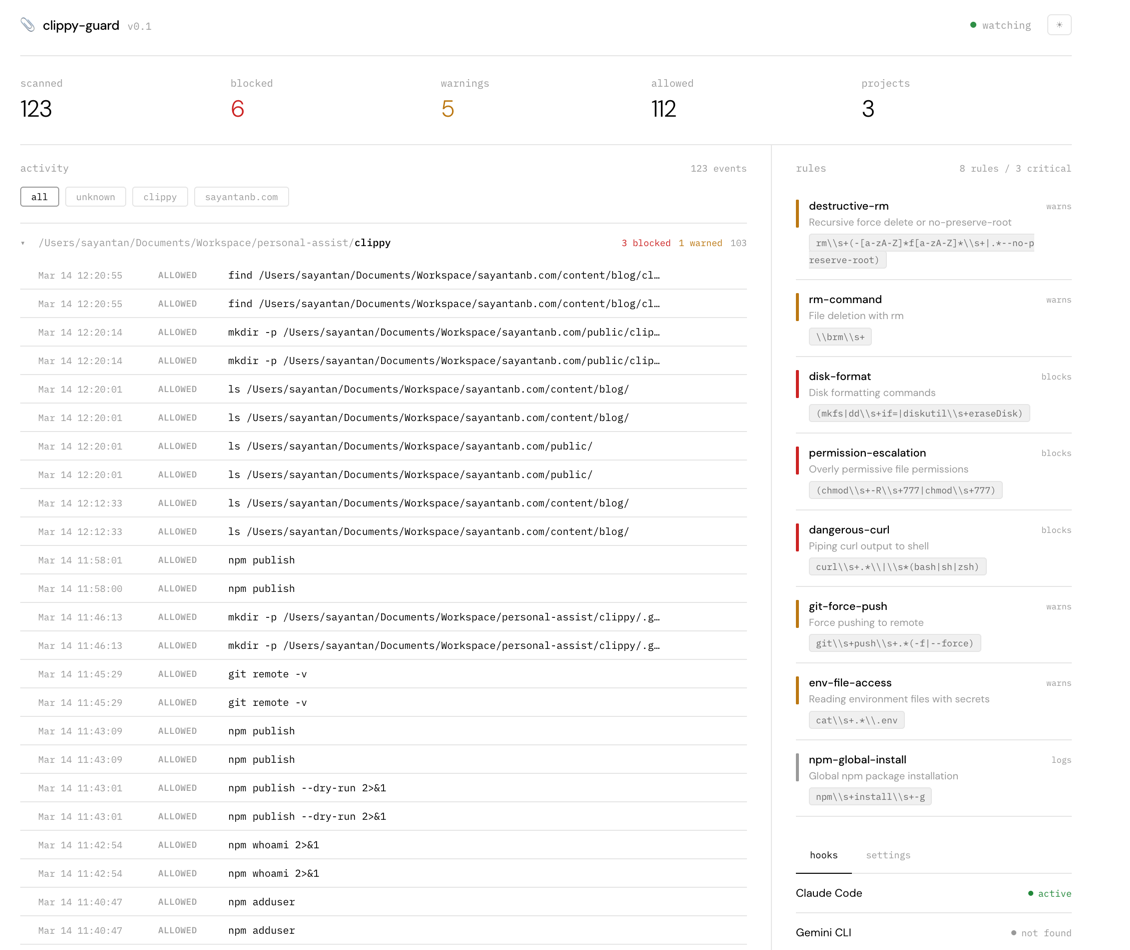
Every single shell command the agent runs is logged to ~/.clippy/activity.jsonl, whether it was blocked, warned, or allowed. Timestamp, project, session, working directory, the full command. This was honestly half the motivation. When something goes wrong, you can trace back exactly what happened.
{
  "ts": "2026-03-14T17:27:11Z",
  "project": "my-app",
  "cwd": "/Users/you/code/my-app",
  "severity": "critical",
  "rule": "destructive-rm",
  "action": "blocked",
  "command": "rm -rf /tmp/test"
}
npx clippy-guard dashboard opens a web UI with live stats, activity grouped by project, active rules, and hook status.
Beyond Safety Rules
The hook model is more general than just safety. The same PreToolUse event can power cost controls, compliance logging, rate limiting, or approval workflows. The pattern is always: intercept, inspect, decide, return feedback.
Hooks turn AI agents into observable, controllable systems. clippy-guard is one practical use case.